
Website and domain migration is a critical process that involves transferring a website from one environment, platform, domain, or hosting infrastructure to another without losing SEO rankings, security integrity, or user trust. When performed incorrectly, migrations can cause traffic loss, broken URLs, malware exposure, and indexing issues. This comprehensive guide explains secure website and domain migration best practices, aligned with Google’s official recommendations and trusted industry sources.
Introduction
Website and domain migration is far more than a technical task—it is a strategic operation that directly impacts SEO, security, user experience, and business continuity. Many organizations underestimate its complexity, resulting in ranking drops, downtime, or even compromised data. For security-sensitive websites, especially those recovering from previous threats, migration must be handled with precision and planning.
At FixHackedSite, we frequently observe that poorly executed migrations often reopen doors to malware, misconfigurations, and indexing disasters. That’s why a structured, security-first migration approach is essential. Whether you’re changing hosting providers, moving to HTTPS, switching CMS platforms, or rebranding with a new domain, the risks are real—and avoidable.
This guide follows a document-style framework, helping developers, SEOs, and business owners execute migrations safely while aligning with Google Best Practices, high-authority industry standards, and search engine trust signals.
Understanding Website and Domain Migration
Website and domain migration refers to any significant change that affects how a site is accessed, structured, or hosted. These changes may include domain name updates, hosting provider switches, CMS changes, URL structure modifications, or protocol upgrades such as HTTP to HTTPS.
From an SEO perspective, Google treats migrations as high-risk events. According to Google Search Central, any major URL or infrastructure change can temporarily affect indexing and rankings if not implemented correctly
Migration is not just about files and databases. It involves:
- Search engine signals
- Crawl paths
- Redirect integrity
- Security headers
- DNS propagation
Ignoring these elements can cause ranking volatility or permanent loss. Successful migration requires planning, staging, testing, and post-launch monitoring.
Security also plays a crucial role. Migrating from a compromised environment without cleanup can transfer malware to the new server, as warned by Sucuri
Types of Website and Domain Migrations
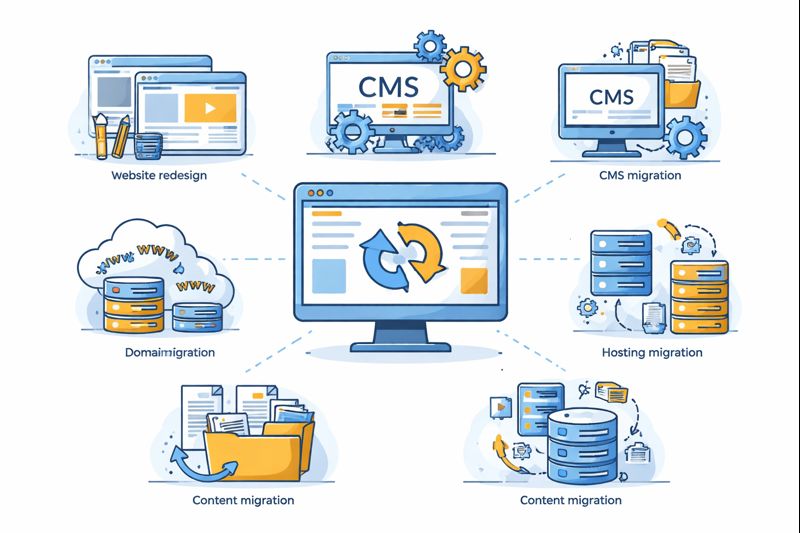
Not all migrations are the same. Understanding the type of migration helps determine risk levels and required safeguards.
Common Migration Types:
- Domain Migration (example.com → newexample.com)
- Hosting Migration (shared → VPS/cloud)
- CMS Migration (WordPress → Headless CMS)
- Protocol Migration (HTTP → HTTPS)
- Structural Migration (URL or site architecture changes)
Each migration type impacts SEO differently. Domain migrations are the most sensitive because backlinks, authority, and brand recognition are tied to the original domain. Moz explains how link equity transfer depends heavily on proper redirects
Hosting migrations, while less visible, can introduce performance and security issues if server configurations differ. Cloudflare emphasizes reviewing firewall rules and SSL configurations during such changes
SEO Risks Associated with Website Migration
Website migrations can severely impact SEO when mismanaged. Google has repeatedly stated that improper migrations are a top cause of ranking drops.
Major SEO Risks Include:
- Loss of indexed URLs
- Broken internal links
- Redirect chains or loops
- Canonical misalignment
- Sitemap inconsistencies
According to Ahrefs, missing or incorrect redirects are the #1 reason for traffic loss during migrations
Search engines rely on consistency. When URLs change without clear signals, Google may treat pages as new or irrelevant, resetting ranking history. This is why 301 redirects are mandatory for permanent moves.
Security Considerations During Migration
Security must be addressed before, during, and after migration. Moving a compromised site without remediation can infect the new environment instantly.
Key security steps include:
- Malware scanning before migration
- Server hardening
- File permission audits
- Removing unused plugins/themes
OWASP highlights misconfigurations as a leading cause of breaches
Additionally, credentials must be regenerated after migration. Old FTP, database, or admin passwords can be exploited if leaked previously.
Pre-Migration Planning Checklist
Planning is the foundation of a successful migration. Without documentation, errors become inevitable.
Pre-Migration Essentials:
- Full website backup (files + database)
- Crawl current site using Screaming Frog
- Export indexed URLs from Google Search Console
- Benchmark traffic and rankings
Google recommends creating a URL mapping document for every changed URL
This checklist acts as a safety net if rollback is required.
URL Mapping and Redirect Strategy
A redirect strategy ensures link equity and rankings transfer correctly.
Best practices:
- Use 301 redirects only
- Avoid redirect chains
- Map every old URL to the most relevant new URL
According to Moz, improper redirects can dilute PageRank
Redirects should be tested before launch using tools like Redirect Path or HTTP Status.
DNS and Hosting Configuration
DNS propagation can take up to 48 hours. During this time, users may hit old or new servers inconsistently.
Key actions:
- Lower TTL before migration
- Verify nameserver records
- Secure DNS with DNSSEC
Incorrect DNS records are a common cause of downtime.
HTTPS and SSL Migration Best Practices

Migrating a website from HTTP to HTTPS is no longer optional—it is a core security and SEO requirement. HTTPS encrypts data exchanged between users and servers, protecting sensitive information such as login credentials, payment details, and personal data. From an SEO standpoint, search engines treat HTTPS as a trust signal, making secure migrations essential for long-term visibility.
During HTTPS migration, the first step is installing a valid SSL/TLS certificate and ensuring it is properly configured across the entire domain. All HTTP URLs must be permanently redirected to their HTTPS versions using 301 redirects, ensuring that link equity and rankings are preserved. Mixed-content issues—where HTTPS pages load HTTP resources—must be resolved, as they weaken security and trigger browser warnings.
Another critical practice is updating canonical tags, XML sitemaps, and internal links to reflect HTTPS URLs. Failure to do so can cause indexing inconsistencies and duplicate content signals. Server headers such as HSTS (HTTP Strict Transport Security) should also be implemented to force secure connections and prevent downgrade attacks.
Finally, post-migration validation is essential. Website owners should verify HTTPS properties in search engine tools, monitor crawl errors, and track traffic changes. A carefully planned HTTPS migration strengthens security, improves user trust, and aligns the website with modern web standards.
Content Integrity and Duplicate Issues
Content integrity plays a vital role during website and domain migration. When URLs, platforms, or domains change, content duplication risks increase significantly. Search engines may struggle to determine which version of a page should rank, leading to reduced visibility or index bloat.
One of the most important steps is maintaining content consistency across old and new environments. Pages should not be unintentionally replicated on staging or development servers that are accessible to search engines. These environments must be blocked using robots.txt or noindex directives to prevent accidental indexing.
Canonical tags must be reviewed carefully. Each migrated page should reference its final destination URL as the canonical version, helping search engines consolidate ranking signals correctly. Additionally, internal links should be updated to point directly to the new URLs instead of relying on redirects, which improves crawl efficiency.
Content audits before and after migration help identify orphaned pages, missing assets, or altered metadata. Even small changes—such as missing headings or modified body text—can affect rankings if not tracked properly. A structured approach to content management ensures that relevance, authority, and user experience remain intact throughout the migration process.
Technical SEO Validation
Technical SEO validation is a critical post-migration phase that determines whether search engines can properly crawl, index, and rank the new website. Even well-planned migrations can fail if technical elements are overlooked after launch.After migration, website owners should use Google Search Console to monitor indexing status, crawl errors, and sitemap submissions.
The validation process begins with checking robots.txt and meta robots tags to ensure important pages are not accidentally blocked. XML sitemaps should be regenerated using the new URLs and submitted to search engines to accelerate indexing. Crawl tools can be used to detect 404 errors, redirect chains, or broken internal links.
Another key aspect is verifying indexation status. Pages that were indexed before migration should continue appearing in search results under their new URLs. Any unexpected drops may indicate redirect issues or canonical conflicts. Structured data and schema markup should also be tested to confirm they remain valid after the move.
Log file analysis can provide deeper insights into how search engine bots interact with the migrated site. By identifying crawl frequency, response codes, and ignored pages, technical teams can fine-tune performance. Comprehensive technical SEO validation ensures the migration delivers stability rather than disruption.
Performance and Core Web Vitals
Website performance often changes after migration due to differences in hosting environments, server configurations, or CMS platforms. Performance optimization is therefore essential to protect both user experience and search rankings.
Core Web Vitals focus on three key metrics: Largest Contentful Paint (LCP), Interaction to Next Paint (INP), and Cumulative Layout Shift (CLS). These metrics measure loading speed, interactivity, and visual stability. Poor scores can negatively affect rankings and increase bounce rates.
After migration, images should be optimized, caching mechanisms reviewed, and unnecessary scripts removed. Server-side improvements such as enabling compression, upgrading PHP versions, or using a content delivery network (CDN) can significantly enhance performance. Database optimization is also important when migrating dynamic websites.
Continuous monitoring helps identify regressions early. Performance testing tools provide actionable insights into bottlenecks introduced during migration. A fast, stable website not only satisfies search engine requirements but also builds user trust and engagement.
Analytics and Tracking Setup
Maintaining accurate data during migration requires proper setup based on Google Analytics documentation to avoid tracking gaps, making it difficult to evaluate traffic trends or conversion performance.
All analytics tools should be updated to reflect the new domain or URL structure. Proper GA4 configuration ensures that traffic, events, and conversions continue to be recorded accurately after migration. Referral exclusions and cross-domain tracking must also be reviewed to prevent attribution errors.
Historical data should be preserved wherever possible. Benchmarks established before migration help compare performance and identify anomalies. Sudden drops in traffic or engagement often signal technical or indexing issues that require immediate attention.
Accurate analytics ensures informed decision-making after migration. Without reliable data, diagnosing problems becomes guesswork. A structured tracking setup protects business intelligence and supports long-term optimization strategies.
Post-Migration Monitoring

Post-migration monitoring is not a one-time task—it is an ongoing process. Search engines may take weeks to fully process changes, and rankings can fluctuate during this period.
Regularly monitoring crawl errors, index coverage, and redirect performance helps detect issues early. Using Ahrefs backlink analysis, site owners can verify whether external links are correctly passing authority through redirects.Any high-value links pointing to broken URLs should be prioritized for fixes.
User behavior metrics such as bounce rate, session duration, and conversion rates provide insight into how visitors respond to the migrated site. Declines may indicate usability or performance issues introduced during the move.
Continuous improvement involves refining technical configurations, updating content, and optimizing internal links. A disciplined monitoring strategy transforms migration from a risky event into an opportunity for growth, stability, and improved search performance.
Common Mistakes to Avoid
Common migration mistakes include:
- Forgetting redirects
- Blocking crawlers accidentally
- Migrating hacked files
- Ignoring backlink updates
- Skipping post-launch audits
Many site owners rush migrations without testing. This leads to permanent SEO loss. Google stresses patience and monitoring after moves
FAQs
Q1. How long does SEO recovery take after migration?
Usually 2–8 weeks if done correctly.
Q2. Should I migrate a hacked site?
Only after full cleanup.
Q3. Are 302 redirects acceptable?
No. Always use 301.
Q4. Do backlinks transfer automatically?
Only with correct redirects.
Q5. Can I change content during migration?
Not recommended.
Q6. Does Google penalize migrations?
No, if done correctly.
Q7. Should staging sites be indexed?
Never.
Q8. What tool helps most?
Google Search Console.
Q9. Is HTTPS migration risky?
Low risk with proper setup.
Q10. When should I update sitemaps?
Immediately after launch.
Conclusion
Website and domain migration is a high-impact, high-risk process that demands technical precision, SEO alignment, and strong security practices. When executed correctly, migration can improve performance, strengthen trust, and future-proof your website. When rushed, it can undo years of growth.
At FixHackedSite, we emphasize secure, Google-compliant migrations backed by industry best practices and authoritative references. A structured approach—planning, execution, and monitoring—ensures long-term success without compromising rankings or safety.